

Next Tuesday, a lot of computers in Kingsport, Johnson City, and Bristol will reach a deadline. Nothing will pop up. No countdown, no red banner, no polite email from Microsoft. Wednesday morning those machines will boot up exactly the way they did on Tuesday, which is the whole problem.
On October 13, 2026, the first year of Microsoft's paid security updates for Windows 10 ends. If your business paid for that first year, it's renewal time, and the price doubles. If your business never paid, those PCs have gone a full year without operating system security fixes, and the bill to catch up is higher than you'd guess.
This isn't an AI post. It's a "go count your computers this week" post.
Why a small office should care
Nobody is targeting your business by name. Attackers run scripts that look for whatever is easy, and a PC that's missing a year of security fixes is easy. The script doesn't care what town it's in.
Verizon's 2026 breach report found that exploiting known security holes passed stolen passwords as the most common way attackers got in, at 31% of breaches. Ransomware showed up in nearly half of all breaches. Of the ransomware victims whose size was known, about 96% were small and midsize businesses. Plenty of those holes were in firewalls and remote-access gear rather than desk PCs, but the pattern is the same either way. A hole everybody knows about, on a machine nobody patched.
In a small office, that usually means one infected PC at the front desk and then everything it can reach. The shared drive, the accounting file, the client records. After that come the calls to clients, the questions from your insurance carrier, and however many days it takes before you can send an invoice again. That's the bill you're actually weighing against $122.
What actually ends on October 13
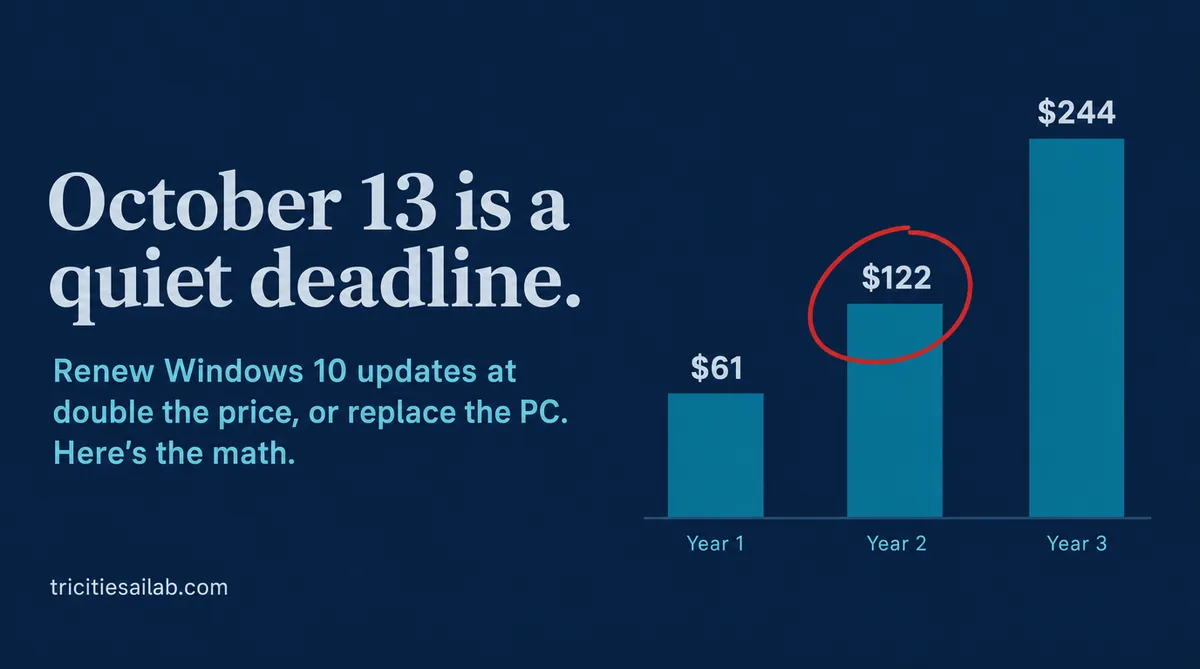
Regular Windows 10 support ended in October 2025. Microsoft then sold businesses a bridge called Extended Security Updates (ESU), priced one year at a time. Year 1 runs out with the October 13 Patch Tuesday release. Year 2 runs from October 14, 2026 to October 12, 2027. Year 3 runs to October 10, 2028, and there is no Year 4.
Microsoft published the first year at $61 per PC and stated that the price doubles every consecutive year. That puts Year 2 at $122 and Year 3 at $244. Microsoft doesn't print those two numbers anywhere; it just printed the rule, and multiplication did the rest.
The part that catches people is that ESU is cumulative. Microsoft's own wording is that a business buying in Year 2 has to pay for Year 1 too. So a PC that skipped the first year doesn't cost $122 to get covered. It costs $183.
For a ten-PC office that renews every machine, Year 2 is $1,220. Year 3 is $2,440. At no point does any of that money buy a faster computer. It buys the same computer, slightly less likely to get broken into.
Renew, upgrade, or replace
Every Windows 10 PC in your office falls into one of three buckets, and the cheapest answer depends on which bucket it's in.
| Option | Cost per PC | What you get | Best for |
|---|---|---|---|
| Free Windows 11 upgrade | $0 in licensing, plus an evening of someone's time | A supported operating system on the hardware you already own | PCs that pass Microsoft's PC Health Check. Plenty of 2018-and-newer machines do, but run the check instead of guessing by age |
| Renew ESU | $122 for Year 2 ($183 if you skipped Year 1), then $244 for Year 3 | Security patches only. No fixes, no features, same aging hardware | A machine tied to software you're retiring within a year |
| Replace the PC | One-time hardware cost, plus setup and data transfer | Windows 11, a reset hardware clock, usually a faster drive | PCs that fail the Windows 11 check, or are already slow and tired |
The comparison that matters is the second year of ESU against the price of a replacement. Covering one PC through the end of the program costs $366 if you bought Year 1, and $427 if you didn't. For reference, a parts reseller listed a refurbished business workstation running Windows 11 Pro at about $322 in September. Prices move, and your shop may beat that, but the shape of the comparison doesn't change.
To be fair to ESU, a new PC isn't free just because the license is cheap. Somebody has to move the files, reinstall the software, and find out which printer driver went missing. Renewing one year can make sense for a machine you're retiring next spring anyway. Renewing a whole office for two more years, on hardware that's already old enough to fail the Windows 11 check, usually doesn't.
One shortcut to skip. There are tricks floating around for forcing Windows 11 onto PCs that fail the check. Microsoft says those machines aren't guaranteed security updates, which puts you right back where you started, only with a nicer Start menu.
"We're on Windows 11." Check anyway.
Here's the twist almost nobody mentions. October 13 is also the last update for Windows 11 version 24H2 on Home and Pro editions. Windows 11 gets a new version every year, and each one has its own end date. A Windows 11 PC that has quietly sat on 24H2 for two years is about to be in the same spot as the Windows 10 machine next to it.
The fix is usually free and boring. Let Windows Update install the newer version. But someone has to look.
Other things expiring the same day
- Office 2021 and Office LTSC 2021. If you bought Office once instead of subscribing, check the year. Support for the 2021 versions ends October 13, and there's no paid extension to buy. These are the programs that open every email attachment that walks in the door.
- Windows Server 2012 and 2012 R2. The third and final year of paid updates ends October 13. If there's a server in a closet handling your shared drive, check what it's running before you check anything else.
- Microsoft Publisher. This one already happened. Microsoft started pulling Publisher out of Microsoft 365 on October 1, so subscribers lose the ability to open it as that update reaches them. Older bought-once copies still run, just without support. If your newsletter, menu, or flyers lived in a .pub file, Microsoft's own advice is to convert it to PDF.
What keeps working, and what doesn't
This is the honest version, because a lot of what's out there leans on scare tactics.
A few pieces keep getting updates even after the operating system stops. Microsoft says Defender antivirus definitions keep coming to Windows 10 through October 2028. Microsoft 365 apps like Word and Outlook get security updates on Windows 10 through October 10, 2028. Edge keeps updating until at least October 2028.
What stops is the operating system underneath all of it. And that matters because of how patches work. Every month Microsoft fixes security holes in supported versions of Windows. Windows 10 and Windows 11 share a lot of the same plumbing, so when a fix ships for one, it also points directly at a hole the unpatched machine still has. Attackers read the patch notes too. An unpatched PC doesn't get less safe on October 14; it gets less safe every month after.
If you take cards or handle patient records
This part isn't legal advice, just where the rules point.
- If you take card payments and a PC handles card data or can reach the systems that do, PCI DSS requirement 12.3.4 has required a yearly review of that hardware and software since March 31, 2025. The review covers whether vendors still send security fixes, what has reached end of life, and a plan to deal with it. "We never looked" isn't a plan.
- Medical and dental offices won't find Windows 10 named in HIPAA. But the HHS cybersecurity practices guide for small practices says to remove end-of-life operating systems, and calls systems without vendor patches a significant risk.
- If you carry cyber insurance, read your next renewal application before you sign it. If it asks whether your systems are supported and patched, the honest answer is now different for every Windows 10 PC you haven't covered.
The five-minute check, one PC at a time
- Find the version. Press the Windows key and R together, type
winver, and press Enter. Write down whether it says Windows 10 or Windows 11, and the version number (22H2, 24H2, and so on). - Check Windows 11 eligibility. On Windows 10 machines, install Microsoft's free PC Health Check app and click Check now. A green check means the free upgrade is on the table. A red X means it isn't.
- Check for ESU, if someone set it up. If you paid for Year 1, whoever installed it can confirm the Year 2 license is in place. If nobody remembers paying, assume you didn't.
- Note what's plugged in. Label printer, check printer, scanner, X-ray sensor, card reader. These matter in the next step.
- Write it down. One line per PC with who uses it, what it runs, and which bucket it's in. At five minutes a PC, a ten-PC office is done before lunch.
Before you upgrade anything
The thing most likely to bite you isn't Windows. It's the one program or device your business can't run without. Accounting software like QuickBooks Desktop, dental and medical practice software, imaging sensors, and older label and check printers are the usual suspects.
Ask the vendor directly whether your exact version works on Windows 11, then upgrade one non-critical PC first and use it for a week before touching the rest. It's slower than doing everything Saturday night. It's also faster than explaining to the front desk Monday morning why nothing prints.
Running a business from a home PC?
The consumer version of ESU, the one tied to a personal Microsoft account, was extended through October 12, 2027. It can be free if you turn on Windows Backup. But it's meant for personal-use PCs. Microsoft doesn't allow it in commercial setups, and it won't work on PCs joined to a company domain or managed by your IT setup. If it's genuinely your personal computer and you answer a few work emails on it, you may qualify. If it's the office PC, plan on the business program.
The one thing to do this week
Count your Windows PCs, run winver on each one, and sort them into upgrade, renew, or replace. That's it. The decision is easy once you can see the list. It's the not looking that gets expensive.
If you'd rather have someone walk the office with you, text me at (423) 967-5584. I'll tell you which machines can upgrade for free, which ones aren't worth $244, and which ones are fine. Including if the answer is "all of them are fine."
Sources
- Microsoft Learn: Extended Security Updates program for Windows 10
- Windows IT Pro Blog: When to use Windows 10 Extended Security Updates
- ABT: Windows 10 ESU Year 2 coverage dates
- Microsoft Lifecycle: Windows 11 Home and Pro
- Microsoft Lifecycle: Office 2021
- Microsoft Learn: Extended Security Updates for Windows Server
- Microsoft Support: Publisher will no longer be supported after October 2026
- Microsoft Learn: Microsoft 365 Apps on Windows 10
- Microsoft Learn: Edge support lifecycle
- Microsoft Support: Windows 11 on devices that don't meet minimum system requirements
- Microsoft Support: How to use the PC Health Check app
- TechRepublic: 2026 Verizon DBIR findings on vulnerability exploitation and ransomware
- PC Server & Parts: Windows 10 ESU Year 2 (refurbished pricing example)
- Help Net Security: Consumer Windows 10 ESU extended to October 2027
- PCI DSS requirement 12.3.4 overview
- HHS 405(d): Health Industry Cybersecurity Practices, Technical Volume 1